A developer who has skimmed the FHIR overview knows two things: there is a base class called Resource, and there is a slightly richer base called DomainResource. That is enough to start navigating R4, and it is where the site's R4 resource atlas begins. Everything else is inheritance, cardinality, and reference. This is a reference-style entry for teams that need the map before the specifics. For the wider setting, the FHIR integration reference has more.
The Inheritance Backbone
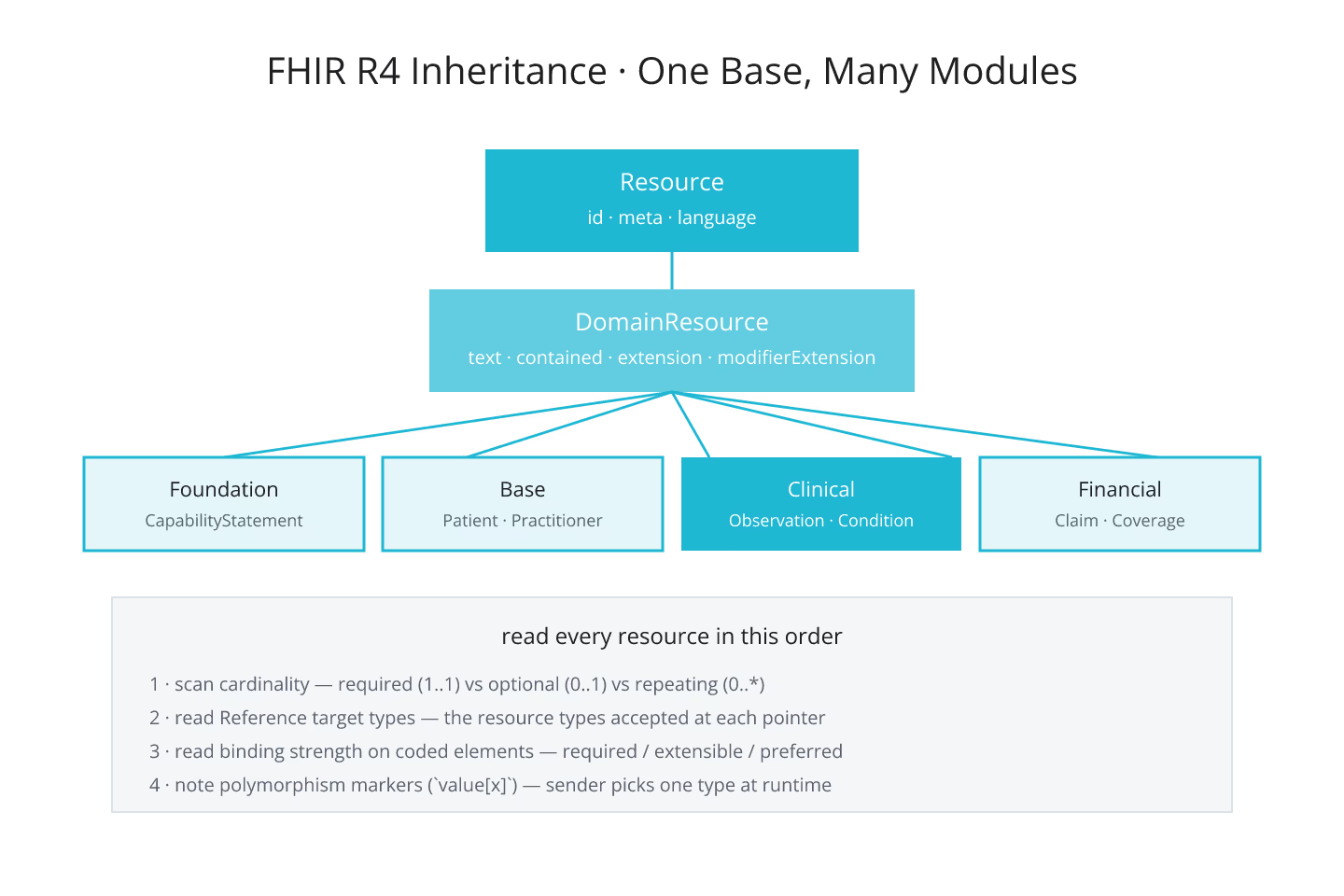
Every FHIR R4 resource inherits from DomainResource, which inherits from Resource. Resource carries the identity elements: id, meta, implicitRules, language. DomainResource adds text (a narrative summary), contained (embedded child resources), extension, and modifierExtension.
That gives every R4 resource:
- A logical id assigned by the server on POST or supplied by the client on PUT
- Version and last-updated metadata under
meta - An optional human-readable narrative under
text - An optional set of embedded resources under
contained - An open-ended extension mechanism
The list is small on purpose. R4 pushes domain-specific detail into the resource-type-specific elements, not the base. That single design decision is what makes the type tree tractable.
What Sits Under DomainResource
R4 groups resources by module: Foundation, Base, Clinical, Financial, Specialized. Each module holds a small number of resources with tight scoping:
- Foundation modules cover CapabilityStatement, StructureDefinition, ValueSet, CodeSystem
- Base modules cover Patient, Practitioner, Encounter, Location, Organization
- Clinical modules cover Observation, Condition, Procedure, MedicationRequest, DiagnosticReport
- Financial modules cover Claim, Coverage, ExplanationOfBenefit
- Specialized modules cover ResearchStudy, MolecularSequence, MedicinalProduct
The atlas surfaces the same grouping. Filter by module first, then narrow to a resource type. That workflow is faster than remembering which module owns a given type.
For the ten resources most teams reach for first, the ten FHIR resources you should learn first enumerates them.
Cardinality Is the Signal That Matters
Every element on every resource has a cardinality: minimum count, maximum count. 0..1 means optional, single. 0.. means optional, repeating. 1..1 means required, single. 1.. means required, repeating.
Reading a resource cold is a matter of scanning the cardinality column. Required elements have to be sent; optional ones can be omitted; repeating ones are always arrays even when they hold a single value. Teams that skim the resource definition without noting cardinality end up with valid-looking payloads that fail validation.
For the deeper pattern of reading a resource definition, reading a FHIR resource definition the way developers read a class covers the mechanic.
Type References Are the Second Signal
Reference elements declare which resource types they can point at. Observation.subject accepts a Reference to Patient, Group, Device, or Location. That declaration is on the resource definition, and clients that ignore it build payloads that reference unsupported types and fail validation.
Reference behavior is a topic on its own. For the deeper split of when to embed vs when to link, reference vs contained: when to embed and when to link is the entry.
Profiles Extend the Base
Profiles are named refinements of a base resource: US Core Patient, International Patient Summary, and so on. They tighten cardinality, add required extensions, or slice a repeating element. For the pattern, profiles and slicing at a glance walks through the model.
What This Buys You
Once the base pattern is clear, every new R4 resource fits into a small mental model: inheritance from DomainResource, cardinality-driven elements, typed references, optional profile refinement. The atlas is the fast lookup; this page is the entry point.
Sources
- HL7 canonical R4 resource index - HL7 canonical R4 resource index, evergreen reference