FHIR profiles are how one resource type serves many implementation contexts. US Core Patient, International Patient Summary, and CARIN Blue Button all profile the same base Patient resource with tighter rules for their audience. Slicing is the mechanism that lets those profiles constrain repeating elements. The two together are what turn a general spec into a national implementation guide. The site's R4 resource atlas marks profile support per resource. For the wider FHIR framing, additional FHIR API notes collects supporting material.
What a Profile Does
A profile is a StructureDefinition that tightens the base resource. It can:
- Raise a cardinality: a
0..element becomes1..for this context - Fix a value:
Patient.identifier.systemmust equal a specific URL - Bind a value set:
Observation.codemust come from a US Core value set - Add a required extension: an implicit rule becomes explicit
- Slice a repeating element: split it into named sub-lists with their own rules
Profiles never loosen the base. They only add rules. That constraint is what makes them safe to compose.
Slicing Explained
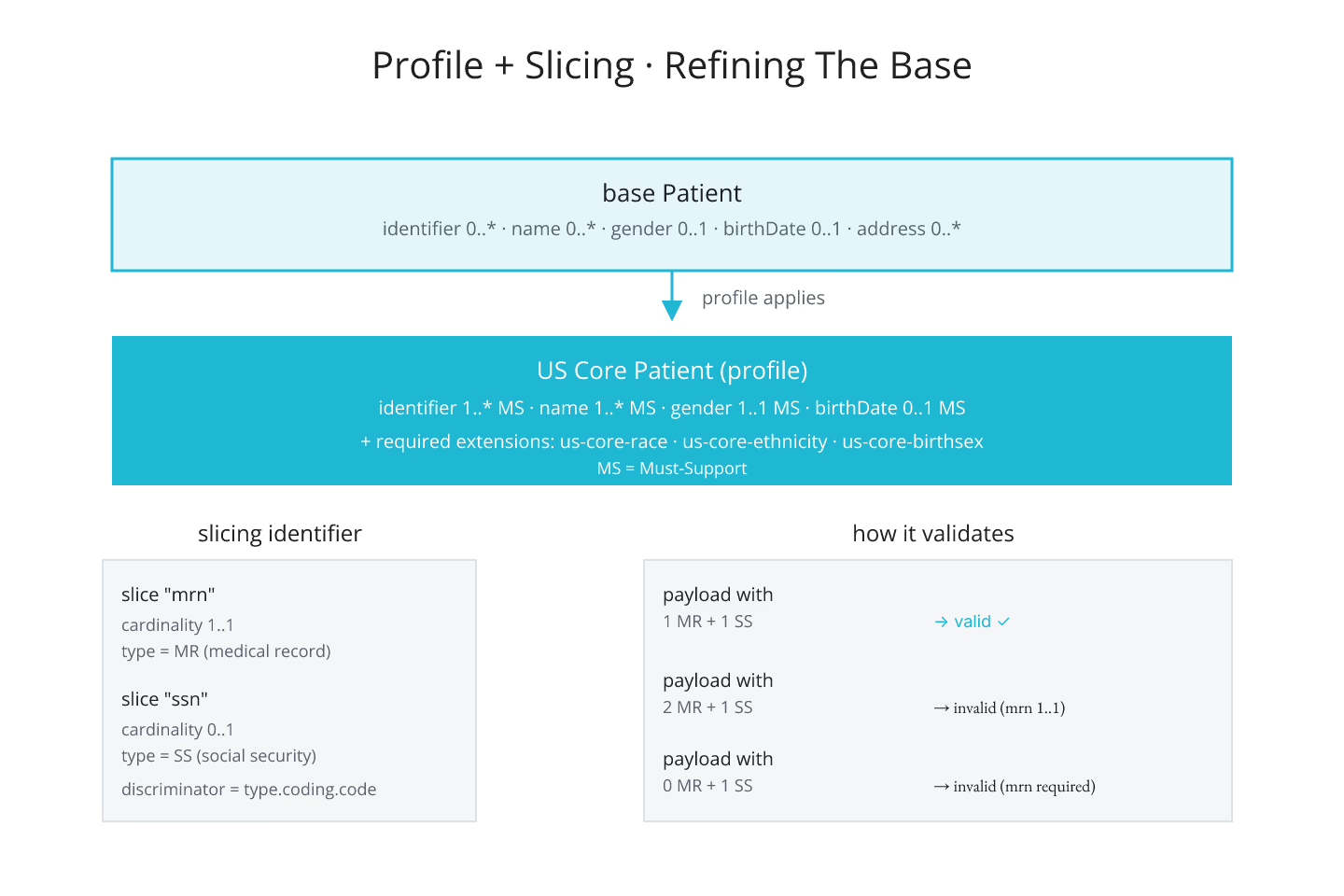
Slicing is what turns a repeating element into named lists. Patient.identifier is 0..*. In a US Core context, it needs to hold one identifier of type MRN and optionally one of type SSN. Slicing declares that split:
- Slice one, name = "mrn", cardinality
1..1, type = MRN - Slice two, name = "ssn", cardinality
0..1, type = SSN
Discriminator picks the slicing key — usually a fixed value on an inner element, like identifier.type.coding.code. The server uses the discriminator to know which slice each entry belongs to.
What Slicing Solves
Without slicing, "one MRN, optional SSN, no other identifiers" cannot be expressed in a profile. Slicing gives implementers a way to say exactly that. The base spec stays general, the profile stays specific.
Slicing on Observation.component is common for panel-style measurements. Blood pressure has systolic and diastolic slices. That is how a validator knows to reject a blood-pressure Observation missing the systolic component.
When To Reach For a Profile
Reach for a profile when:
- A jurisdiction or program requires specific fields
- A workflow needs required extensions the base does not include
- A repeating element needs named sub-lists with different rules
- Validation needs to reject payloads that pass the base spec but fail the domain rules
For the extension mechanic that profiles rely on, the extension model: when a FHIR resource is silent on your data is the entry.
Must-Support Is a Profile Concept
The mustSupport flag lives on profile elements. It signals that implementers have to handle the element — but not that senders have to populate it. The distinction is subtle and often misread. For the deeper picture, must-support elements and what implementers actually do covers it.
Where To Read Them
Every profile publishes a StructureDefinition, and the differential view lists exactly what changed from the base. Reading the differential is the fast way to know a profile's rules. The atlas surfaces the profile URLs per resource; the differential is one click away.
The Short Version
Profiles refine, slicing shapes repeating elements, discriminator picks the slicing key, mustSupport signals handler obligation. Once you can read a profile's differential, R4 implementation guides stop feeling opaque. For the base pattern, navigating FHIR R4 resources when you know DomainResource but not much else is the entry.
Sources
- HL7 canonical R4 profiling chapter defining profiles and - HL7 canonical R4 profiling chapter defining profiles and slicing